The Microsoft Speech API is what is used for the Narrative accessibility feature built into Windows. You can also write programs that call the API, which would allow you to let your applications speak.
But making your computer say what you want is pretty easy actually! Here’s how you do it:
Step 1: Open Notepad and paste the following text into a new document:
Dim message, sapi
message=InputBox(“Enter the text you want spoken”,”Speak This”)
Set sapi=CreateObject(“sapi.spvoice”)
sapi.Speak message
message=InputBox(“Enter the text you want spoken”,”Speak This”)
Set sapi=CreateObject(“sapi.spvoice”)
sapi.Speak message
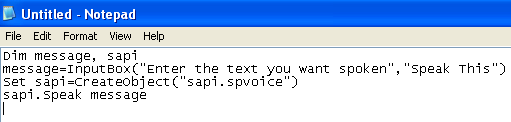
It should basically look something like this:
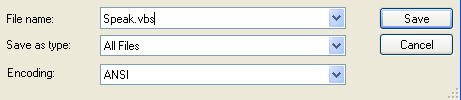
Now when you go to save the file, give it any name, but make sure you also type .VBS after the name. Also, for the Save as type box, choose All files instead of the default Text Documents.
Now double-click on the VBS file and you should see a input box where you can type in the text you want spoken! Go ahead and type something and click OK.

That’s it! Your computer will speak to you in the default voice, which for me was some scary seductive male type of voice! What about yours? Enjoy (This would be fun to do on someone else’s computer as a joke.)

No comments:
Post a Comment